Good automation handles the routine. Great automation handles the exceptions.
Most automation demos show the easy case. The harder question is what happens to the one request that does not fit the rules — and how it reaches the person who has to decide.
Most automation demos show the easy case.
An order arrives. The data is valid. The amount is within the expected range. The workflow runs. Everything completes automatically.
Real processes are rarely that clean.
A customer asks for an unusual discount. A payment does not match the invoice. A document is missing. A request is perfectly legitimate, but different enough that the system should not decide on its own.
That is where useful automation is often won or lost.
Twenty-nine and one
Imagine 30 quote requests arrive in one day.
Twenty-nine are straightforward. The customer is known, the requested discount is within policy and the required information is present.
One is different. The customer asks for a 12% discount, while the standard range is 0–8%.
There are several bad ways to handle it.
The system can reject the request automatically. It can stop and create a vague task: needs review. Or the whole process can remain manual because exceptions exist.
None of these is particularly good automation.
A better system handles the 29 routine cases automatically and brings the unusual case to the right person, with the context to decide it. For example:
Quote request #QR-2026-1042 — Brightworks
- Estimated value: €1,980
- Requested discount: 12%
- Standard range: 0–8%
The system can then bring together the information that matters: previous orders, customer history, past discounts, margin or whatever else is relevant.
It may even suggest an action:
Suggested counter-offer: 10%
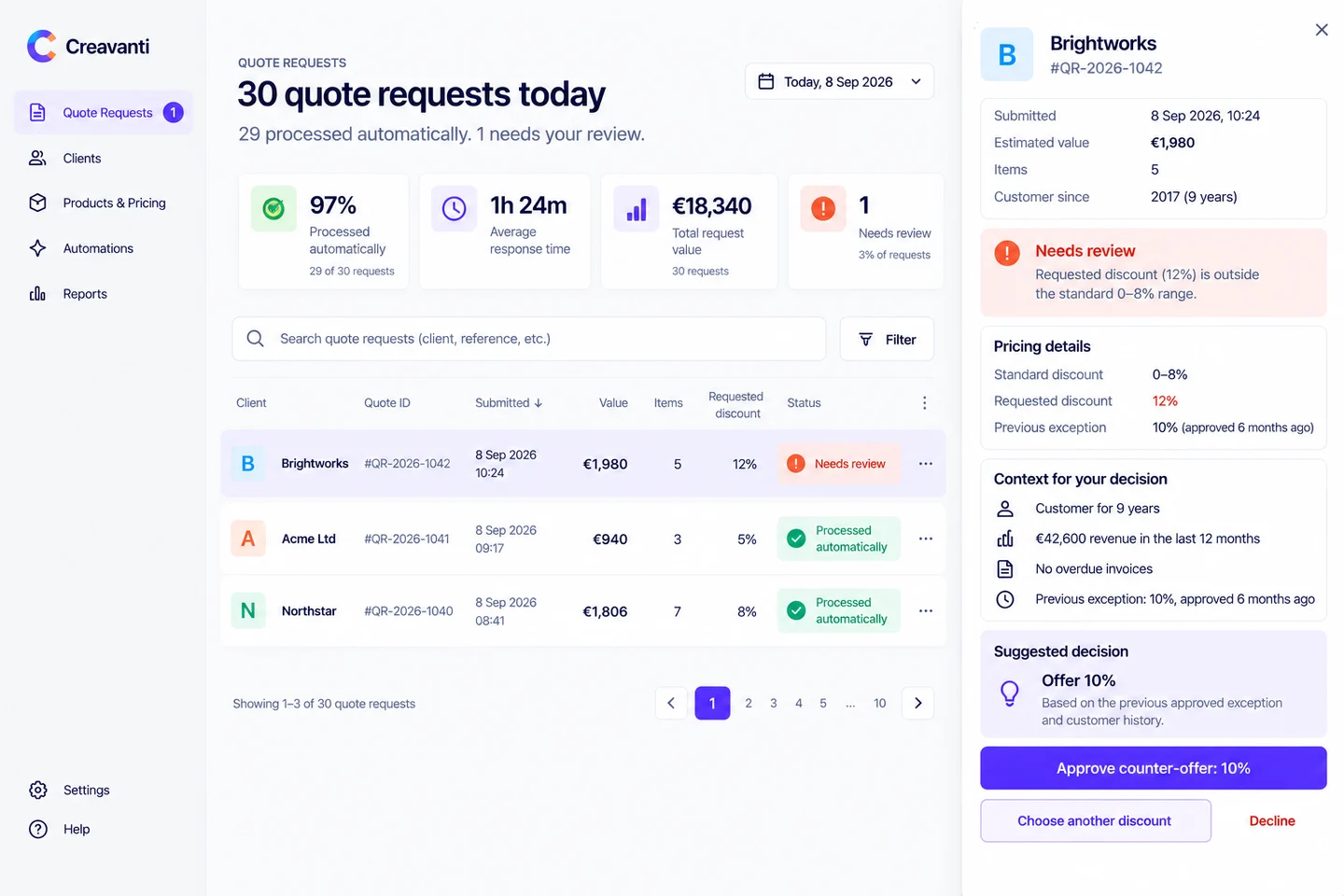
The person still decides. But they no longer have to reconstruct the entire case before they can do it.
The exception should arrive with its context
One of the easiest mistakes in workflow automation is to automate detection without automating preparation.
The system notices something unusual and creates a task: needs review.
Technically, a person is now in the loop. Operationally, very little may have improved.
The reviewer still has to open the CRM, find the customer, check previous orders, look up the commercial rules, calculate the impact and work out what normally happens. The automation has identified the problem but left most of the work untouched.
A useful exception should arrive with the reason it was flagged, the relevant context and the actions available to the person making the decision. In the quote example, those actions might be:
- Approve 12%
- Approve counter-offer: 10%
- Choose another discount
- Decline
The goal is not to remove the person from every decision. It is to make the intervention small, informed and deliberate.
We use the same pattern ourselves
This is not only a pattern we recommend to clients. We use it in our own booking flow.
Normal bookings move through the automated path without intervention. But when an action cannot be authenticated safely, the system does not try to make a clever guess and continue anyway. It refuses to act automatically.
The operator side then shows what is waiting, and why.
That distinction matters. The automation is not judged by whether it managed to act on 100% of cases. It is judged by whether routine cases move without unnecessary work, and whether the cases it should not decide are surfaced clearly enough for someone to deal with them safely.
There are situations where the correct automated action is not “do more”. It is stop, explain and hand over.
Human-in-the-loop is not a failure of automation
There is a tendency to measure automation by how close it gets to 100%. That is often the wrong target.
If 95% of a process is repetitive and predictable, automating that 95% may create most of the value. Trying to remove the final 5% of human judgement can make the system disproportionately more expensive, complex and risky.
This is especially true when the remaining decisions involve commercial judgement, ambiguous information, unusual customer situations or meaningful financial consequences. The signs that something should not be automated at all are a separate list; this is the same argument one level down, inside a process worth automating.
The better question is not:
Can we automate the entire process?
It is:
Which decisions are routine enough for software, and which ones should still belong to a person?
That boundary should be designed deliberately.
Exceptions should not become a hidden queue
There is another failure mode.
Automation handles the easy work perfectly while unusual cases quietly accumulate somewhere else. Nobody knows who owns them. There is no priority. There is no alert when one has been waiting too long.
The automated part looks efficient, but the customer still experiences the delay.
A production-ready exception flow therefore needs more than a status.
It needs ownership — who should see this? It needs timing — how long can the case wait? It needs escalation — what happens if nobody acts? And it needs enough visibility to answer a simple operational question:
What is currently stuck, and why?
That last question is often more useful than knowing what percentage of the process is automated.
Not every exception needs the same treatment
A practical way to design the workflow is to separate three kinds of work.
Routine decisions. The rules are clear, the inputs are reliable and applying the rule produces a predictable result. Automate them.
Exceptions with clear boundaries. The system can recognise that the case is unusual, but a person should choose what happens next. Automate the detection and preparation. Keep the decision human.
Ambiguous work. The process itself is poorly defined, people apply different rules, or the required information is unreliable. Do not automate it yet. Clarify the process first.
This distinction often matters more than whether the eventual solution uses workflow software, custom code or AI.
AI can help without owning the decision
AI can make exception handling more useful. It can summarise a case, extract information from documents, compare the current request with previous ones, and draft a response or suggest the next action.
But a recommendation is not automatically a reason to give the system authority to act. For some decisions, the useful role of AI is to prepare the decision, not make the decision.
For the unusual quote, for example, the system might surface:
This customer has been with you for nine years and has spent €42,600 in the last twelve months, with no overdue invoices. The largest previous discount was 10%, approved six months ago. A 10% counter-offer would keep this deal closer to the usual margin range.
That can turn several minutes of investigation into a much faster decision, while keeping accountability where it belongs.
Check one of your own processes
Take one workflow your team already wants to automate. Write down the normal path, then ask:
- What causes a case to leave the normal path?
- Can the system recognise those situations reliably?
- Which exceptions can still be resolved automatically?
- Which ones genuinely require judgement?
- What information does a person need to make that judgement?
- Can the system bring that information together automatically?
- What happens if nobody reviews the case?
- Who ultimately owns the decision?
If you can automate the normal path but cannot answer the last four questions, the automation probably is not finished.
Short of the time? What to automate first asks the same kind of questions and answers them in two minutes.
How we approach it
At Creavanti, we do not start by asking how to automate every step. We start by separating the routine from the judgement.
The routine should disappear into the background where possible. The exception should not. It should arrive with the reason it was flagged, the relevant context and clear actions for the person responsible.
Sometimes that means rules and a workflow. Sometimes it means integrating existing systems. Sometimes AI can help interpret information or prepare a recommendation. And sometimes the correct decision is simply to leave an action with a person.
The goal is not automation for its own sake. It is a process in which software handles what software is good at, and people spend their time on the decisions that actually need them.
Automate the routine. Make the exceptions easy to decide.
If you have a process where the normal cases are straightforward but the exceptions keep pulling people back into spreadsheets, email and manual checks, our 20-minute check starts there. We look at the actual flow, what can safely move automatically and where keeping a person in the loop makes more sense.
And if pushing the automation further would add more complexity than value, we will tell you that too.